TURBOTAX BUSINESS
File your own corporate
taxes with expert help
Get your T2 business return done with on-demand expert guidance
—all within your budget.

Get your T2 business return done with on-demand expert guidance
—all within your budget.
Ask unlimited questions as you go, and get a final review for 100% confidence.
How Expert Assist works

EXPERT FULL SERVICE
We do your taxes for you
A dedicated expert handles your taxes for you, from start to finish.
How Expert Full Service works

DO IT YOURSELF
Do your own taxes
Answer simple questions and we’ll walk you through your return.
How it works

Our newly redesigned tax software is packed with features that help you file with confidence.

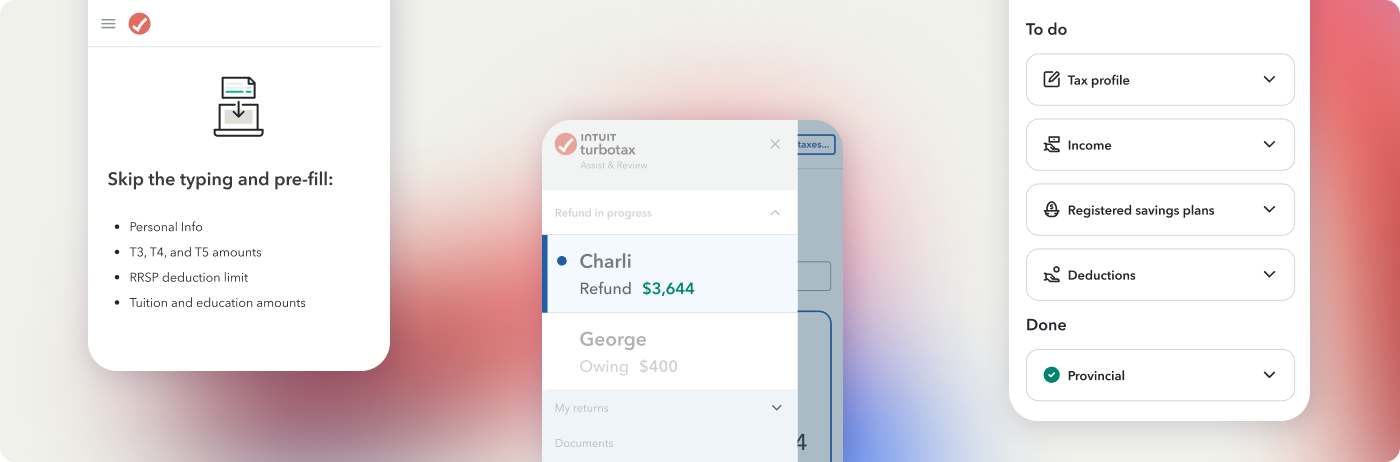
Upload last year’s T1and connect to the CRA’s Auto-fill my return to pre-fill your personal and tax info.

Track your refund, live. If you file with a spouse, we optimize your returns together.

We’ll walk you through tax preparation and suggest personalized next steps.
Upload last year’s T1and connect to the CRA’s Auto-fill my return to pre-fill your personal and tax info.
Track your refund, live. If you file with a spouse, we optimize your returns together.
We’ll walk you through tax preparation and suggest personalized next steps.


5M+
Canadians file with TurboTax every year
30+ years
of Canadian tax preparation and filing experience
File with confidence. Your tax return is backed by Canada’s best tax software.



Your tax return is backed by 1,000+ Canadian tax experts and their guarantee.

Yes, all TurboTax software products for tax year 2025 are CRA NETFILE-certified.
Income tax preparation software companies must seek NETFILE certification from the CRA for tax preparation software products to be used in conjunction with CRA’s NETFILE electronic tax filing service.
Yes! If you have a simple tax return*, you can file your taxes with our TurboTax Free product for $0.
Quebec is the only province in Canada where residents must file two separate tax returns: one federally (T1) to the CRA, and one provincially (TP1) to Revenu Québec (RQ).
You can file both returns using TurboTax Do It Yourself, Expert Assist, and Desktop products. But, TurboTax Expert Full Service is not available in Quebec.
If you have direct deposit set up with the CRA, you will receive your refund within 8—10 days of filing.
If you don’t have direct deposit set up, it will take up to 6 weeks to receive a refund cheque by mail.
We know the 2025 tax code inside and out, so you get accurate results without the stress.
What you get:
Yes. We give you the same accuracy and guarantee your maximum refund*—at a fraction of the cost.
If you have a simple tax situation, you can file for free. If you’re unsure about filing your own taxes, TurboTax Expert Assist gets you unlimited help from a real tax expert—including a final review of your return—so you can file with confidence.
If you don’t want to file your own taxes, you can choose TurboTax Full Service and have a dedicated tax expert do it all for you at a transparent, affordable price.
Absolutely. We make it easy to switch. You can upload your 2024 return and we’ll import any relevant tax info for you. Once you connect TurboTax to your CRA account, we’ll then pull all your current tax slips and carry-forward amounts directly, so you can skip the typing and be ready to go in minutes.
For a limited time: Switch to TurboTax and get unlimited help from a real tax expert for only $60.* Offer ends April 15. Learn more about our Switch & Save promotion
The following TurboTax Do It Yourself offers may be available for tax year 2025. Intuit reserves the right to modify or terminate any offer at any time for any reason in its sole discretion. Unless otherwise stated, each offer is not available in combination with any other TurboTax offers. Certain discount offers may not be valid for mobile in-app purchases and may be available only for a limited period of time.







© 2026 Intuit Canada ULC or its affiliated companies. All rights reserved. Intuit, QuickBooks, QB, TurboTax and ProFile are registered trademarks of Intuit Inc. Terms and conditions, features, support, pricing, and service options subject to change without notice.
Copyright © Intuit Canada ULC, 2026. All rights reserved.